
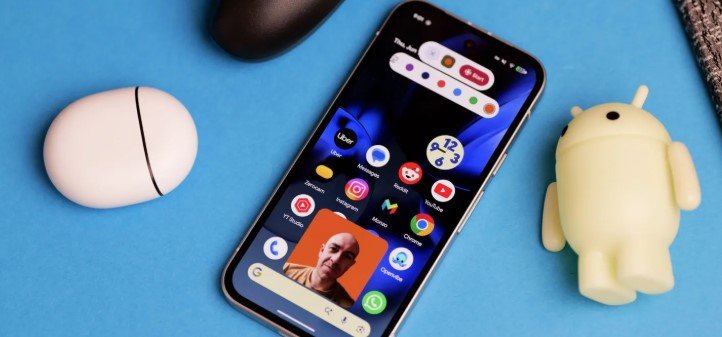
Google has officially rolled out Android 17 QPR1 Beta 4 to eligible Pixel devices, introducing a highly anticipated system-level feature called “Screen Reactions.” Building upon the native screen recording tool introduced in previous operating system versions, this new functionality allows users to seamlessly activate their front-facing selfie camera while recording their display. The camera feed is neatly layered over the interface in a dynamic, resizable picture-in-picture window, enabling content creators, app developers, and everyday users to record their real-time facial expressions, gestures, and spoken commentary directly alongside their on-screen activities without requiring third-party software.
To use the new feature, users simply open the Quick Settings panel, tap the standard Screen Record tile, and toggle on a new “Show Front Camera” switch before hitting start. The operating system places the circular or rectangular camera overlay on the screen, which can be dragged to any corner of the display during the recording process to prevent it from blocking crucial text or user interface elements. Furthermore, Google has integrated privacy safeguards into the system; the front-camera overlay dynamically pauses or blurs when a user navigates into sensitive application screens, such as password managers, banking apps, or secure messaging windows, ensuring that personal data is never accidentally captured in the final video file.
This latest beta build also brings an array of stability fixes, security patches, and optimizations to the core user interface, preparing the operating system for its stable public release later this year. By introducing native selfie camera integration directly into the Android 17 framework, Google is actively streamlining the workflow for mobile gamers, tech reviewers, and educators who rely heavily on video walk-throughs. As the QPR1 testing cycle nears completion, this user-centric addition highlights a broader effort to make professional-grade content creation tools universally accessible on the Android platform.